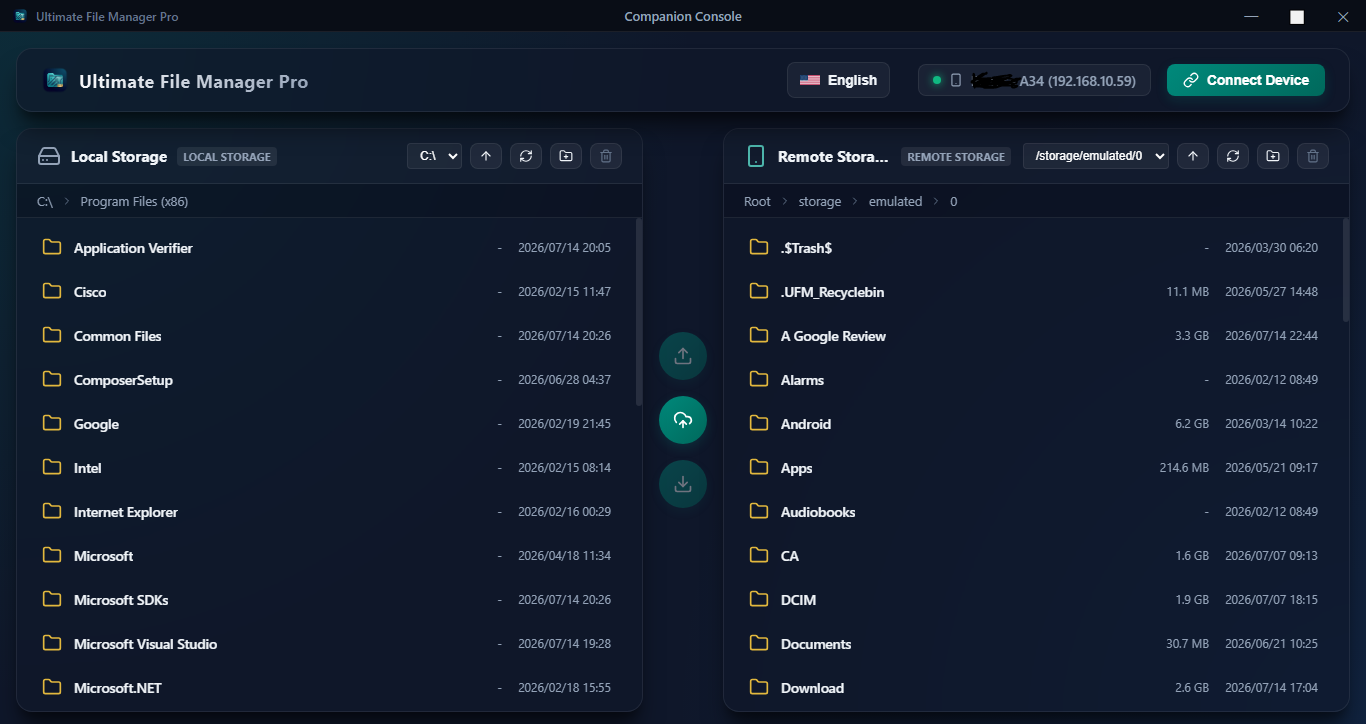
The ultimate dual-pane file management experience, built for power users. Free of closed-source trackers, proprietary SDKs, and store billing scripts in our open FOSS release.
UFM automatically switches layouts depending on your device type, delivering a native, optimized experience for touchscreens and TV remote controls alike.
Designed for fast on-the-go touch management, featuring a stunning glassmorphic UI, responsive gesture actions, and system integrations.
Built completely for D-pad navigation, eliminating the struggle of using standard mobile applications with a standard TV remote.
Connect UFM Pro on your Phone or TV to your Windows PC over the local network. Experience lightning-fast dual-pane file management, batch transfers, and drag-and-drop APK sideloading directly from your desktop.
The Windows Desktop Companion bridges the gap between your desktop and Android systems. Authenticate securely with a 4-digit PIN, and immediately browse, transfer, and synchronize folders side by side without setting up complex FTP credentials.
Every tool you need to manage, secure, analyze, and sync files across local, network, and cloud storage.
Manage files across two folders at once using side-by-side or stacked panels. Drag, copy, or move items between folders instantly without losing your place.
Protect your private files with hardware-backed AES-256-GCM encryption. Secured by a 4-digit PIN and a recovery key system. Your files never leave your device.
Host local FTP or secure sFTP/SSH servers directly on your device. Easily browse, edit, and transfer files between your computer and Android storage over Wi-Fi.
Run a built-in web server to manage files using a standard web browser on your network. Features certificate-based HTTPS, access PINs, and APK installation tools.
Access remote servers (SMB2, SMB3, FTP, SFTP, NFS v3/v4, DLNA) and cloud endpoints (WebDAV, Amazon S3, MinIO, Dropbox, OneDrive, and Google Drive) directly.
Set background sync schedules to back up local directories to your network share (SMB/FTP) automatically daily, weekly, monthly, or on customized intervals.
Pair and control Android TVs or local network devices over ADB. Access raw shell terminals, run troubleshooting commands, and take remote screenshots seamlessly.
Features built-in PDF renders, text notepad editors, office spreadsheet viewers, animated image rendering (GIF, WebP, SVG, APNG), and a media player.
Compress files into zip archives or extract 7Z (LZMA/LZMA2), ZIP, and TAR archives. Supports password protection and military-grade AES encryption.
Scan drive metadata for disk charts, large files lists, and duplicates. Index storage values in a local database for instant, blazing-fast search results.
Inspect all installed system and user applications. Extract APKs, install split APKs (XAPK) from local storage, and review pre-installed bloatware recommendations.
Read, write, rename, and delete protected records inside Android system folders (`Android/data` and `Android/obb`) using Shizuku / Shevery API keys or root permission.
Share your feedback, request features, and connect with other Ultimate File Manager Pro power users on our official subreddit.
r/UFManagerPro ↗Download Ultimate File Manager Pro today and experience a clean, dual-pane desktop-grade file manager right on your Android phone, tablet, and smart TV.